REPLAY · v0 · prototype · 2026
aryaask/replay · github.com
REPLAY v0 · 2026.04
§01 Bug reports for AI coding agents
Source-only · MIT

Click record.
Show your bug.
Get the perfect description.

You can paste a screenshot into Claude. You can’t paste a video. Replay closes that gap: a 30-second screen recording becomes a structured markdown timeline plus key frames, sized for an LLM’s context, ready to paste into Claude Code, Cursor, anything.

Capture ~30 s
Render ~5 s
Tokens ~10 k
Cost ~$0.01
§02 The gap

Showing a bug to your AI agent shouldn’t be harder than showing it to a colleague.

log·002 · 2026-04

Today’s options

  • Paste a screenshot. Loses temporal context. The model sees the symptom but never the path that caused it.
  • Record a video. ~100k+ tokens to ingest, expensive, and current video models downsample to N independent frames anyway.
  • Type a bug report. You forget half the steps. The interesting one is always the one you didn’t mention.

With Replay

  • Hit record. Screen + audio + UI events captured locally. Three layers of redaction before anything leaves the machine.
  • Reproduce. Hit stop. ~5 seconds later you have a timestamped markdown timeline plus the key frames inline.
  • Paste it. Into Claude Code, Cursor, GitHub Issues. ~10k tokens for the same coverage as a 100k-token raw video.
§03 Demo

A 26-second flow becomes a structured timeline.

demo·001 · 01KQCB5R · 2026-04-29
capture · raw recording 26s · h.264
User browses Rate My GitHub, lands on their profile (66.3/100, ouch), clicks through to GitHub, ends on the 3D-Engine repo. No narration.
report.md replay · 01KQCB5R

Replay — Browsing Rate My GitHub score for AryaaSk and clicking through to the 3D-Engine repo

Recorded: 26s

Timeline

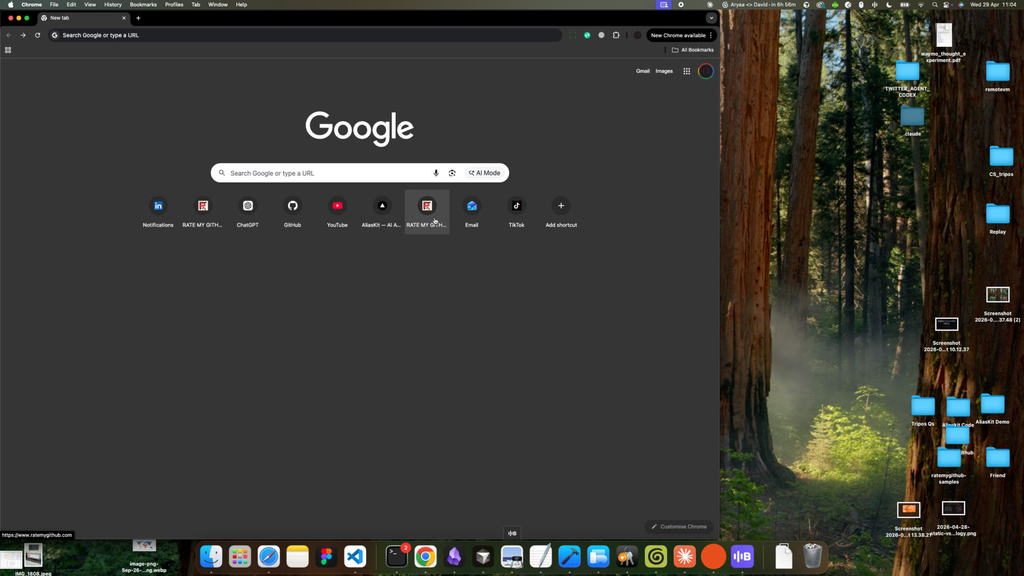
  1. [00:03] User clicks on a New Tab in Google Chrome showing the Google homepage with shortcut tiles (GitHub, ChatGPT, YouTube, Gmail, etc.). Frame 01: Chrome new tab
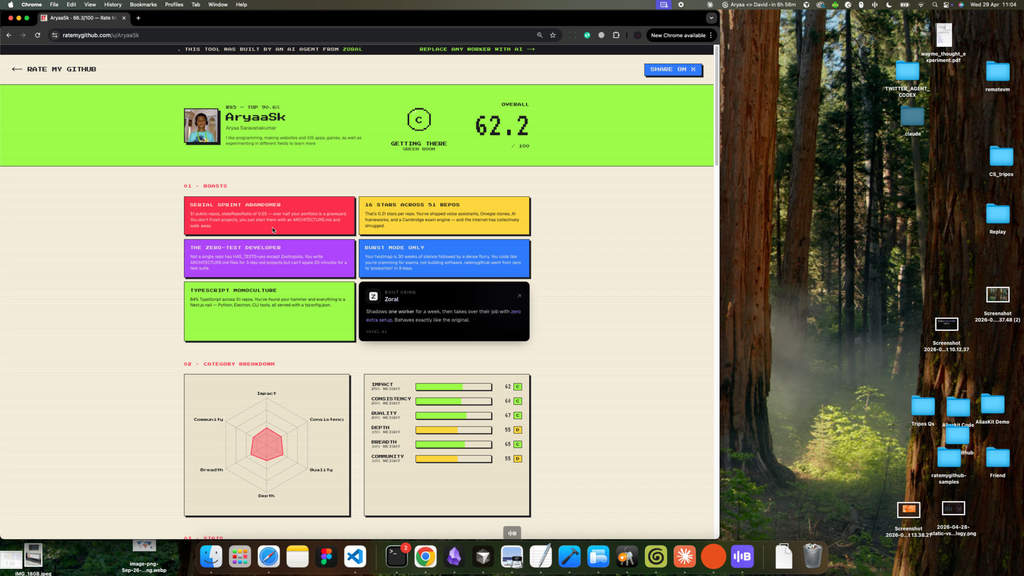
  2. [00:08] Page loads at https://www.ratemygithub.com/ ("RATE MY GITHUB — arcade-grade developer scoring").
  3. [00:10] User clicks through to https://www.ratemygithub.com/u/AryaaSk.
  4. [00:11] Profile page renders with window title "AryaaSk · 66.3/100 — Rate My GitHub", showing a score dial and stat panels. Frame 03: profile score dial
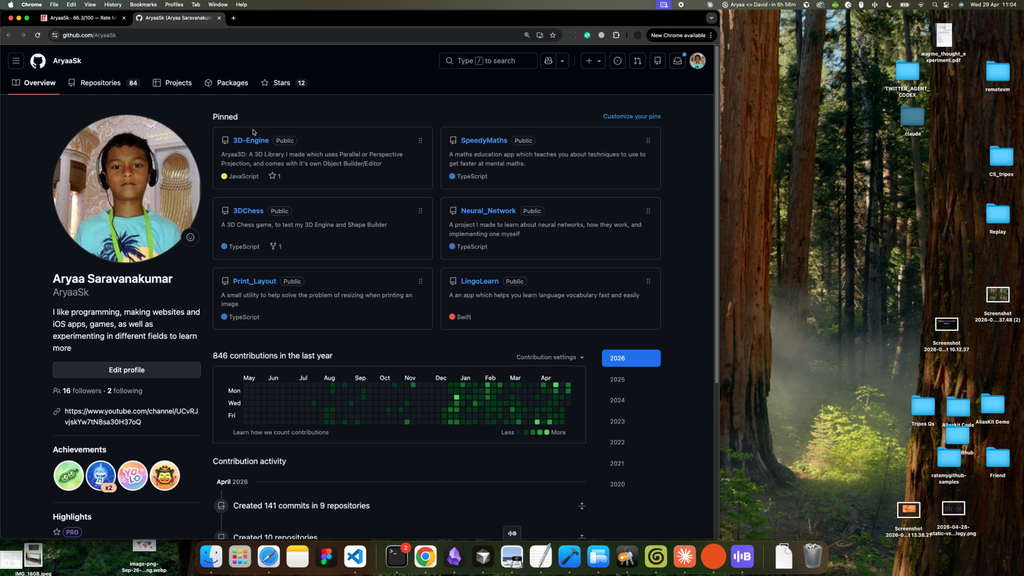
  5. [00:12] User clicks on the profile page (appears to follow a link out to GitHub).
  6. [00:16] Browser navigates to https://github.com/AryaaSk — the GitHub profile for "AryaaSk (Aryaa Saravanakumar)" with pinned repos and contribution graph. Frame 04: GitHub profile
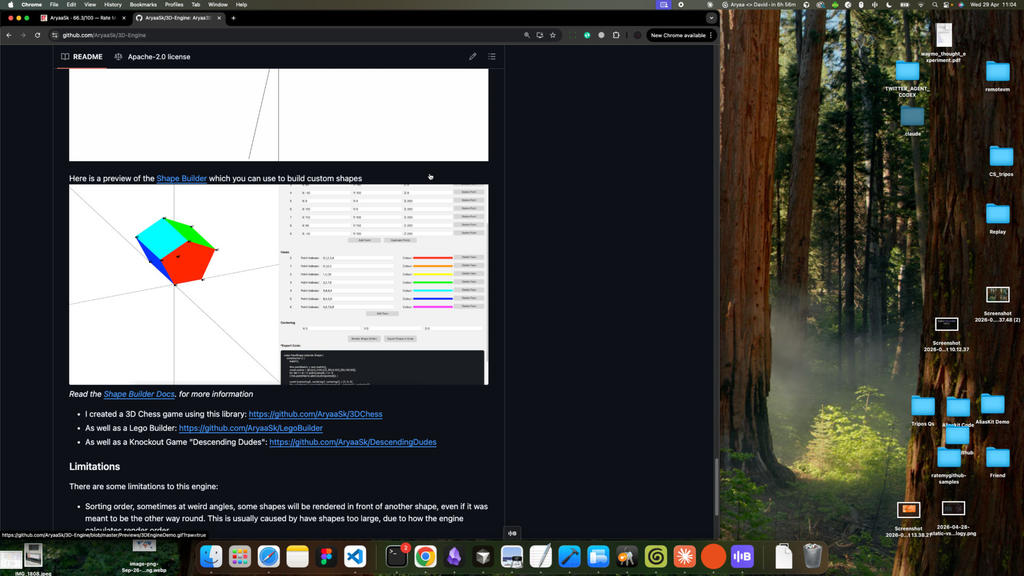
  7. [00:23] Browser is on https://github.com/AryaaSk/3D-Engine — repository titled "Aryaa3D: A 3D Library I made which uses Parallel or Perspective Projection, and comes with it's own Object Builder/Editor", showing README content with a 3D cube screenshot and a "Limitations" section. Frame 05: 3D-Engine repo
  8. [00:25] User clicks within the 3D-Engine repository page.

Left: the raw screen recording. Right: what Replay produced from it, paste-ready into Claude Code, Cursor, or anywhere else. Frames live alongside the report on disk under ~/Library/Application Support/Replay/replays/<id>/; on copy, the frame paths get rewritten to absolute file:// URLs so the markdown stays portable.

§04 Pipeline

Four steps. All local until the last.

spec · pipeline.md
01 · Capture screenpipe records.

A managed screenpipe binary captures frames, OCR, UI events, and audio into an isolated SQLite DB under Replay’s app folder. Cold-spawn by default; nothing runs outside an explicit recording.

screenpipe · sqlite3 · sck-rs
02 · Coalesce Events get tokenised.

A Node sidecar polls the DB, dedupes frames across monitors, collapses keystroke bursts into single text events, drops scroll/mouse-noise, and joins OCR only on app/window transitions.

node · better-sqlite3 · ts
03 · Pick frames Key moments only.

Frames at every meaningful state change: app switch, modal open, error appearance, page navigation. Compressed, OCR-blur-redacted on per-frame coordinates, ready for vision input.

sharp · png · ocr boxes
04 · Describe An agent writes the report.

Local Claude Code by default (no API key, uses your CLI auth), or BYOK Anthropic / OpenAI vision. Output is markdown: title, narration, numbered timeline with inline frame references, suggested investigation.

claude code · gpt-5 · sonnet-4-6
§05 The format is the bigger bet

A timestamped markdown timeline with key frames is the video equivalent of token + positional index.

Raw video ~100k tokens · opaque to LLMs
Structured replay ~10k tokens · addressable

This is the same problem the Transformer architecture solved for text. A sentence is a sequence; each word has a temporal position; you can’t evaluate words in random order. Positional encoding kept the temporal information while letting the model see all words at once.

Video has had the same problem. Current video models downsample to N frames and treat each as an independent image, throwing away the temporal structure that made language models work in the first place.

A structured replay is the video equivalent of token + positional index. Frames have positions. Events have timestamps. App and window state is named.

Once a video is addressable, every downstream use gets cheaper: agents can reason about state at t=14s and what changed by t=18s without rebuilding it from raw pixels every time.

§06 Once a video is addressable

Three things get cheaper.

implications · open
Implication 01

An AI watching your day.

At 6pm it tells you: “you spent 47 minutes in Slack, 12 of which were re-reading the same thread; your PR for X stalled at 2pm when you got pulled into a meeting.” Local-only. BYOK. Replay’s capture stack is most of the way there.

Implication 02

Diffable video editing.

Today, AI video tools generate end-to-end from a prompt and you can’t tweak frame 47. With a structured intermediate you edit at the script level: cut t=3 to t=5, replace dialogue with X. The same diff-and-PR workflow we have for code.

Implication 03

Demos that survive.

Sales calls where the prospect’s engineers can grep weeks-old footage for “did we see retries on the API call.” Tutorials with addressable bookmarks. Bug reports that read like commit messages.

§07 Privacy posture

Local-only
by default.

  • CAPCold-spawn capture. screenpipe runs only during an explicit recording. Always-warm with a 60s look-back is opt-in and visibly indicated.
  • REDThree layers of redaction. screenpipe’s built-in PII removal, regex secret scan in the sidecar, image-region blur on per-frame OCR coordinates.
  • KEYBYOK. Anthropic / OpenAI keys live in macOS Keychain under app.replay. No backend, no relay, no analytics.
  • UIThree indicators. macOS native screen-recording dot (purple), Replay’s tray icon (red while capturing), pulsing record button in-app.
  • RMWipe-on-quit. Toggle defaults ON. Clears ~/Library/Application Support/Replay/ on app exit. Nuclear “wipe everything” button in Settings.
§08 Build it yourself

Source-only.
Five steps. Ten minutes the first time.

Replay is not shipped as a notarised .dmg. It’s a hobby project, source on GitHub, MIT-licensed. Clone it, build it, run it. Prerequisites: macOS 13+, Node 22+, Rust toolchain, and either Claude Code installed or an Anthropic / OpenAI key.

↗ Full step-by-step in BUILDING.md